Powerful Models I Still Wouldn’t Leave Unsupervised
GPT-5.6 is a huge leap over GPT-5.5. It is faster, more capable and better with real files. It can also lose the plot, burn a Pro window and confidently solve the wrong problem.
GPT‑5.6 feels like the first OpenAI model that can carry a serious engineering task for hours. That does not make it a senior engineer. It makes it a very fast team that needs a technical lead.
That difference matters. A static marketing page can come together in one session. A production SaaS product is different. It has permissions, migrations, billing, failure states and old code that nobody wants to touch. The model will not infer every hidden rule. If the prompt leaves room for a bad assumption, GPT‑5.6 can turn that assumption into clean code at remarkable speed.
We used GPT‑5.6 across multi-service development, database work, frontend design and business documents. We also reviewed OpenAI’s latest documentation, independent benchmarks and public reports from Codex users. The result is not another launch-day victory lap. It is a field guide for the weeks after launch.
| API context | 1.05M tokens |
|---|---|
| Sol Ultra | 4 agents in evals |
| Luna price cut | 80% on July 30 |
The newest GPT‑5.6 news changes the economics
OpenAI released GPT‑5.6 on July 9. The family has three tiers. Sol is the flagship. Terra is the daily workhorse. Luna is the low-cost model for volume. All three are available in ChatGPT Work, Codex and the API.
Then came the most important update since launch. On July 30, OpenAI cut Luna API prices by 80 percent and Terra prices by 20 percent. Luna now costs $0.20 per million input tokens and $1.20 per million output tokens. Terra now costs $2 and $12. Sol stays at $5 and $30.
OpenAI also added Sol Fast mode to the API. It promises up to 2.5 times the speed for twice the price. The company says intelligence stays the same. This is useful when a person is waiting. It is a poor default for overnight work where latency has little business value. The full update is in OpenAI’s July 30 price-performance announcement.
| Model | Input | Cached input read | Output | Best use |
|---|---|---|---|---|
| GPT‑5.6 Sol | $5.00 | $0.50 | $30.00 | Uncertain, difficult and high-stakes work |
| GPT‑5.6 Terra | $2.00 | $0.20 | $12.00 | Everyday coding and general work |
| GPT‑5.6 Luna | $0.20 | $0.02 | $1.20 | Background agents and well-specified volume |
The pricing shift also changes how Terra and Luna consume paid-plan credits in Codex and ChatGPT Work. Subscription prices and quota budgets did not change. The cheaper models simply use fewer credits. This is exactly why model routing now matters more than picking one “best” model.
A practical route is simple. Let Sol resolve uncertainty and create the plan. Give clean implementation tasks to Terra. Use Luna for tests, classification, routine edits and background checks. OpenAI now recommends a similar outcome-based approach.
What the launch claims get right
The jump from GPT‑5.5 to GPT‑5.6 is not subtle. OpenAI reports 88.8 percent on Terminal-Bench 2.1 for Sol and 91.9 percent for Sol Ultra. The benchmark tests whether an agent can work inside a real terminal. It must inspect files, run commands and recover from errors.
Sol also scores 71.2 percent on SEC-Bench Pro. This is a security benchmark for proof-of-concept generation on complex software. It is strong evidence that the model can reason about difficult code. It does not mean the model can safely operate any production system alone.
Independent results point in the same direction. Artificial Analysis placed Sol near the top of its intelligence index and first on its Coding Agent Index when GPT‑5.6 launched. Sol Max was close to Claude Fable 5 on general intelligence while costing far less per evaluation task. You can see the methodology in the Artificial Analysis GPT‑5.6 report.
Our own experience matches the broad picture. GPT‑5.6 is much better at finding a bug that crosses the API, database and frontend. It can keep the logic of several prototypes in one project. It is better at producing a usable interface. It fixes issues that GPT‑5.5 could circle for hours.
Other developers report the same leap. One public OpenAI forum post describes rebuilding two medium-sized agent projects with much stronger frontend and backend results than GPT‑5.5. The same user also reported four to five times the token consumption and exhausted a high-tier allowance in one or two days. That is the GPT‑5.6 story in miniature. Better work. Higher appetite. See the full user report on OpenAI’s developer forum.
Five claims that need context
GPT‑5.6 arrived with technical claims that quickly turned into myths. Some are true. Some are customer-specific. Some describe a different product than the one developers actually receive.
| Claim | Verdict | What the evidence says |
|---|---|---|
| Luna fell 80% and Terra fell 20% in price. | Verified | OpenAI announced both cuts on July 30. Sol pricing did not change. |
| Luna has a universal 90% prompt-cache reuse rate. | One workload | Blitzy reported that its own production agent loop improved from 24% to 90% reuse. OpenAI also gives cached reads a 90% price discount. Neither number guarantees a 90% hit rate for your app. |
| GPT‑5.6’s tokenizer always uses 22% fewer input and 23% fewer output tokens. | Overstated | Base44 observed those savings across 30 app-building conversations versus GPT‑5.5. OpenAI did not publish them as a universal tokenizer guarantee. |
| Programmatic Tool Calling is a native Linux sandbox that runs Bash and Python until the job passes. | Incorrect | The API feature lets the model write and run in-memory JavaScript that coordinates eligible tools and processes intermediate results. Codex can work in a sandboxed environment, but that is not the same claim. |
| Ultra is simply a longer chain of thought. | Incomplete | OpenAI’s GPT‑5.6 evaluations run Ultra with four agents. Parallel work can improve the result. Total tokens include all agents. |
This distinction is not pedantic. A production system designed around a guaranteed 90 percent cache hit rate will fail its budget if the real rate is 35 percent. A team expecting a hidden Linux container from a tool-calling API may build the wrong security boundary.
A million-token window can still lose the plot
GPT‑5.6 has an API context window of 1.05 million tokens. That number is real. So is the experience of a long Codex thread becoming slower, less focused and strangely forgetful.
Context capacity and context quality are different things. A large window can hold more history. It does not make every old instruction equally important. A long project chat collects abandoned requirements, failed commands, temporary workarounds and repeated summaries. The model must decide which parts still matter. Eventually it can protect an old rule that you replaced three hours ago.

OpenAI’s own Codex guidance now warns about this. It calls out context pollution and context rot. It recommends one chat per coherent unit of work. It also recommends starting a new thread when the goal changes. This is not a workaround invented by impatient users. It is part of the documented operating model.
Public reports show the failure mode. A July 24 Codex issue describes a GPT‑5.6 Sol thread at 93 percent of its available context. Automatic compaction repeatedly reread files, lost completed work and consumed an estimated 10 to 15 percent of the user’s paid allowance. The developer had to reconstruct the project in a new chat. Read the full compaction-loop report on GitHub.
Another report describes Sol appearing to forget the immediately previous turn before compaction. There are also reports of practical Codex windows being smaller than the headline API window. The exact available context can depend on the product, plan and runtime. The number shown by your active Codex session is more useful than a model card when you are planning the next hour of work.
Keep a durable handoff in the repository
We keep a development log in the project root. Codex updates it after meaningful work. The file is not a transcript. It records only the state another engineer needs to continue.
## Current goal
One sentence. State the outcome, not the activity.

## What changed
- Files and migrations changed
- Decisions that are now final
- Tests added and their result

## Current state
- What works
- What is incomplete
- Known failures

## Constraints
- Do not change these public interfaces
- Do not edit unrelated modules
- Ask before schema or dependency changes

## Next safe step
The smallest verified action for the next chat.
This file makes a new chat cheap. It also gives the model a current source of truth. If an old conversation conflicts with the log, the log wins.
Why Extra High can empty a five-hour window
Higher reasoning effort is not free intelligence. It is more computation. It can use more tokens, take longer and call more tools. GPT‑5.6 made this visible because the top modes are strong enough to stay busy for a long time.
In our use, Extra High exhausted a five-hour Pro window for the first time in months. Other users reported sharp usage increases after the release. Some simple tasks consumed several percentage points of a rolling allowance. A separate forum report says GPT‑5.6 Ultra delivered much better work than GPT‑5.5 but used four to five times the tokens.
OpenAI’s Codex manual describes usage in rolling five-hour windows. It also says the real cost depends on model, context, reasoning, tools, retrieval and cache behavior. Prompt length alone is not a useful estimate. The live usage meter or /status is the source to trust for your account.
Extra High is worth paying for when an error is expensive. Use it for architecture decisions, incident diagnosis, security review and a stubborn cross-system bug. Do not use it by habit for copy changes, test generation or a known refactor.
| Effort | Use it for | Avoid it for |
|---|---|---|
| Medium | Daily implementation, normal debugging, code review | Problems with large uncertainty or severe consequences |
| High | Multi-service bugs, migrations, performance work | Mechanical edits and routine tests |
| Extra High / Max | Architecture, complex incidents, security, final verification | Default project mode |
| Ultra | Bounded tasks that benefit from parallel independent analysis | Open-ended work with no agent cap or budget |
Subagents are a multiplier, not a checkbox
A subagent does not make one model think in a slightly broader way. It starts separate model and tool work. That can save wall-clock time. It can also multiply token use.
OpenAI says Sol Ultra uses four agents in its published evaluations. Codex can use a different number based on the product, instructions and configuration. There is no safe public rule that says it will always launch one to three agents or never exceed six.
We learned this the expensive way. A loose instruction to use subagents for speed and quality created more than ten workers. Usage disappeared almost immediately. Other users have reported similar surprises. One GitHub report says eight subagents consumed an entire Pro window in about a minute. Another reports subagents running at higher reasoning effort than requested.
The solution is not “never use subagents.” It is to define the budget like a manager.
Use at most 3 subagents.

Agent 1: inspect authentication and permissions. Read only.
Agent 2: inspect billing and webhook paths. Read only.
Agent 3: inspect tests and failure coverage. Read only.

Do not spawn nested subagents.
Do not edit files until all three reports are returned.
Each report must be under 400 words and cite exact file paths.
After the reports, propose one implementation plan and wait for approval.
This prompt creates three independent views. It prevents write conflicts. It also makes the cost visible before implementation begins.
Static pages are easy. SaaS is still management
GPT‑5.6 can produce a convincing static page from a short brief. That is not the same as building a production product.
A SaaS application has invisible requirements. An account can belong to two organizations. A payment can arrive twice. A migration can succeed on one replica and fail on another. An admin can lose access halfway through a job. A field that looks optional may be required by an old integration.
The model works from the prompt, the repository and the tools it can reach. It cannot know a rule that exists only in a founder’s head. It will often follow one branch of the flow and leave the neighboring branch untouched. The result can look polished while the system is inconsistent.
The most useful mental model is a capable junior team. Give it a narrow outcome. Explain the business rule. Name the files it may change. Define the forbidden changes. Require proof. Review the diff.
Goal
Make Stripe subscription cancellation idempotent.

Business rules
- A repeated webhook must not create a second audit record.
- Existing active access ends only at current_period_end.
- Admin cancellations and Stripe cancellations share one status transition.

Scope
- Inspect billing/webhooks, subscriptions/service and related tests.
- Do not change the public API response shape.
- Do not add a dependency or database column without asking.
- Do not edit unrelated formatting.

Verification
- Add tests for duplicate delivery, out-of-order delivery and rollback.
- Run the smallest relevant test suite first.
- Show the changed state machine before editing.
- Stop and ask if repository behavior conflicts with these rules.
OpenAI’s own prompting guidance supports this approach. It asks developers to provide domain context, hard constraints, approval boundaries and success criteria. GPT‑5.6 understands intent better. It does not remove the need to state the intent.
The design is better. The default still looks generated
GPT‑5.6 is a clear upgrade for frontend work. Spacing is better. Hierarchy is better. It can turn a reference into a functional interface with fewer corrections.
But without direction, the same patterns return. There is a giant hero. There are too many cards. Every section explains itself twice. The type is oversized. The result looks competent and interchangeable.
This is not only a model problem. Most users ask for “a modern SaaS landing page.” That prompt describes a category. It does not describe a brand.
For production design, give the model a visual system. Include type sizes, container widths, spacing, border behavior, responsive rules and real reference images. State what to avoid. Give it examples of pages the team already approved. Designers without prompt practice will not get the same result from a vague request as a product designer who supplies a full system.
PDF, Excel, Word and PowerPoint are a real win
One improvement is easy to underestimate. GPT‑5.6 is much better at finished files.
OpenAI says the model produces more polished documents, spreadsheets and presentations. Microsoft reported stronger results across Microsoft 365 workflows. Canva reported better slide creation with fewer tokens. Independent testing by Artificial Analysis also placed GPT‑5.6 at the top of its presentation ranking at launch.

Our experience matches that. The model can use real formatting instead of drawing a flat imitation. It handles Word structure, spreadsheet formulas, PDF layout and PowerPoint masters with much less cleanup. This makes it useful for work that ends in a file a colleague must edit.
Human review still matters. A beautiful spreadsheet can contain the wrong formula. A polished PDF can repeat a false claim. The model has improved the production layer. It has not removed the approval layer.
Why root instruction files work
Long prompts are fragile. Project files are durable.
Codex automatically reads AGENTS.md instructions. A root file sets rules for the project. A nested file can add rules for a specific directory. This is the right place for stable commands, architecture boundaries and review standards.
Keep the file short. A giant policy document creates the same context problem it was meant to solve. Put detailed workflows in separate Markdown files and link to them only when needed.
# Project rules

- Read DEVELOPMENT_LOG.md before changing code.
- Never edit migrations that have shipped.
- Do not change public API contracts without approval.
- Keep changes inside the requested feature.
- Ask before adding dependencies or environment variables.
- Run: pnpm lint
- Run the nearest test suite before the full suite.
- Update DEVELOPMENT_LOG.md after verified work.
- If requirements conflict, stop and ask.
- Do not spawn subagents unless the task explicitly sets a cap.
This reduces micromanagement because the important rules travel with the repository. It also protects a new chat from missing the decisions made in the old one.
The GPT‑5.6 workflow that survives real projects
- Choose one coherent outcome. Do not mix billing, design and deployment in one chat because they happen to belong to one product.
- Load durable context. Put stable rules in
AGENTS.md. Put current state inDEVELOPMENT_LOG.md. Keep both current. - Make the model inspect before it edits. Ask for the state machine, affected files and risk list. Correct the plan before code multiplies the mistake.
- Set boundaries. Name forbidden files, public contracts, approval points and the exact definition of done.
- Route by uncertainty. Use Sol for decisions. Use Terra for most implementation. Use Luna for routine volume. Use top effort only when the risk justifies it.
- Cap parallelism. Set the exact number of subagents, their roles and whether they may write. Ban nested delegation unless you truly need it.
- Require evidence. Tests, screenshots, command output and changed file lists are stronger than “done.”
- End the chat on purpose. Update the handoff file. Start the next outcome in a fresh thread before context rot decides for you.
The honest verdict
GPT‑5.6 is one of the largest practical upgrades OpenAI has shipped for developers. It is better at terminals, cross-system debugging, frontend work and finished business files. The new Terra and Luna prices also make a routed agent stack much more realistic.
It is not an autonomous senior engineering organization. It still follows the information it is given. It can optimize the wrong branch. It can preserve a dead requirement. It can spend aggressively when reasoning and subagents are left open-ended.
The winning approach is not to trust it more or less. It is to manage it better.
Use GPT‑5.6 as a fast implementation force. Keep architecture, business rules and final approval with humans. Give the model durable project memory. Keep chats narrow. Cap subagents. Ask for proof. Start over before the thread becomes a museum of old decisions.
That may sound less magical than autonomous software development. It is also how GPT‑5.6 becomes useful enough for production.
Verification
Sources and references
- OpenAI: GPT‑5.6 launch and benchmark report
- OpenAI: July 30 price-performance update
- OpenAI API: GPT‑5.6 Sol model page
- Codex manual: projects and long chats
- Codex manual: AGENTS.md
- Codex manual: subagents
- Codex manual: plans and usage
- Artificial Analysis: GPT‑5.6 independent evaluation
- Developer report: GPT‑5.6 Ultra on two projects
- Codex issue: compaction loop and lost progress
- Codex issue: prior-turn context loss
- Codex issue: subagent reasoning effort
FAQ
Is GPT‑5.6 Sol worth using instead of GPT‑5.5?
Should I keep an entire project in one Codex chat?
Does the 1.05M context window mean Codex always gives me 1.05M?
Is a 90% GPT‑5.6 Luna cache hit rate guaranteed?
How many subagents should I use?
 LaPrompt AI News Aug 7, 2026 Better AI Code Without Watching Every Step GPT-5.6 Sol and Claude Opus 5 debate the approach in a shared log before writing code. Three incidents show where the human gate still matters.
 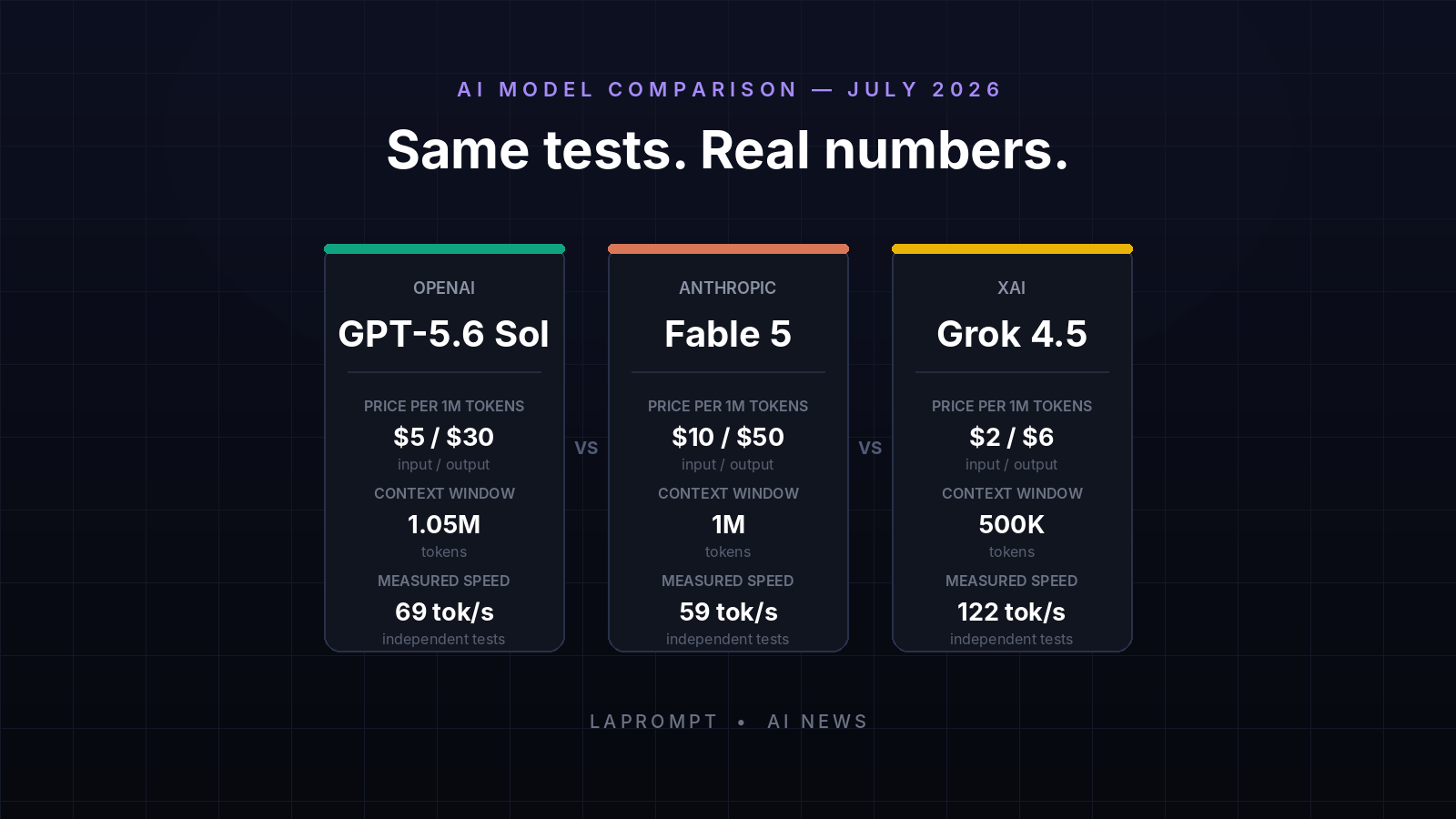 LaPrompt AI News Jul 12, 2026 GPT-5.6 Sol vs Fable 5 vs Grok 4.5: Real Tests and Cost GPT-5.6 Sol vs Claude Fable 5 vs Grok 4.5 across real coding tests, API pricing, speed, context, reliability, benchmarks, and developer feedback.
  LaPrompt AI News Jul 12, 2026 Claude Fable 5 vs Sonnet 5 vs Mythos 5: Which Model Should You Use? Compare Claude Fable 5, Sonnet 5 and Mythos 5 across pricing, 1M context, coding, agents, safeguards, availability and API changes.
Comments
1 totalLoading comments...